Setting up UR-Sim
The free UR robot simulator
1. Why UR-Sim over Gazebo
I am using Gazebo as a comparison, but this really, is applicable for any physics simulator.
a. Why I prefer this over using a UR on Gazebo?
- The only interface ROS really has to the robot is via ros_control (and it’s derivatives). Since a UR in Gazebo uses different controllers than the real hardware, sometimes, due to the quality of the physics engine in your simulator, you may get unexpected behaviour or even worse, some functionalities tested over Gazebo may not work at all on the real robot.
- If I am trying out a 3rd party plugin that I do not trust, I have always found it safer to run it on the UR-Sim and then test it on the real machine.
- Since UR-Sim and the real hardware use the exact same controllers, it is highly convenient for me as a developer to switch between the two. (often coming down to a simple IP change)
b. Are there disadvantages?
- I have experienced artefacts with some 3rd party motion planners (such as random trajectory preempts during execution) which were not present on the real robot. These can be attributed to the fact that the simulation is built to use as little resources as possible and may not be able to keep up with the actual control commands. But, all built-in moveit planners work beautifully.
- Gazebo is a complete simulation enfironment with physics built in, whereas the UR-Sim only simulates the robot controller. So if you are trying out something where the robot has to interact with the environment (such as picking up an object, or juggling coming up soon btw ; ) ) you really only have Gazebo or any other physics simulator as an option right now.
2. Setting up the Virtual-Machine
a. Getting the machine
Even if you are on a Linux machine, go to the link and download the simulator for non-linux machines. You will have to create a free login in the Universal Robots website. Then extract the same.
b. Installing the machine
I prefer virtualbox for all my VMs but feel free to use VMWare. The instructions below are for virtualbox:
- First, we have to create a network interface between the virtual machine where the simulator runs and the host machine. For this, go to File -> Host Network Manager.
- Here we create a new host only network. The default settings are generally 192.168.56.1/24
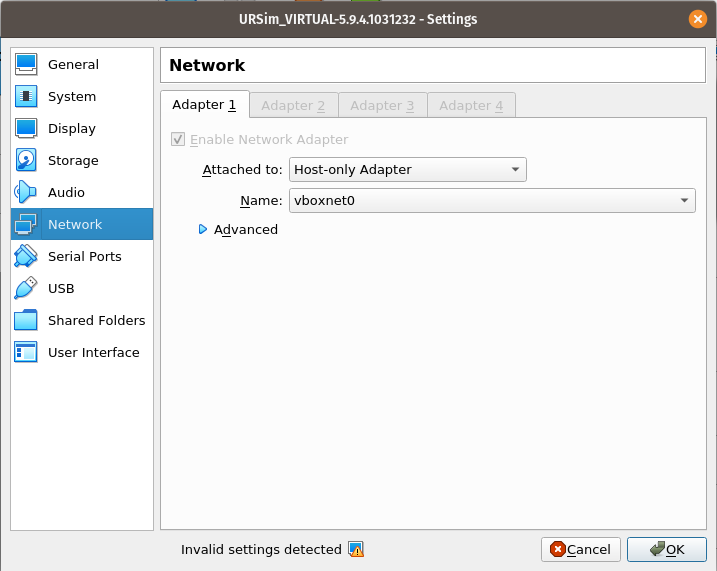
- Now navigate to the folder where you had extracted the downloaded VM and doubleclick on the file with .vbox extension.
- In the machine settings, go to network and choose the host only adapter that you just created. I generally prefer having the host-only-adapter as the only network adapter in my UR-Sim. (This setup should work for you as well if you are not planning to connect to the internet via the UR-Sim’s lubuntu based machine.)
- The last step is to install the UR-Cap and the robot programs on the Universal Robot controller. Since the controller is the same as the real robot, I will not go into the details of the same, but, in-order to transfer the .urcap files to the virtual machine, I have found the easiest way to be via the trusty old scp. The command would look like this if you wanted to install caps on the ur10e:
scp /path/to/cap/file/on/host ur@192.168.56.101:/home/ur/ursim-current/programs.UR10Remember the sudo password is easybot
3. Downloding UR ROS driver
In a catkin workspace,
a. First we need the UR ROS driver
git clone https://github.com/UniversalRobots/Universal_Robots_ROS_Driver.git src/Universal_Robots_ROS_Driver
b. Now we get the robot’s description
git clone -b calibration_devel https://github.com/fmauch/universal_robot.git src/fmauch_universal_robot
c. After installing all necessary dependancies with
rosdep install --from-paths src --ignore-src -y
We can finally catkin_make to build everything
4. Moving the robot
You have to calibrate your robot controller to the exact configuration of the robot. You can do this with
roslaunch ur_calibration calibration_correction.launch robot_ip:=<robot_ip> target_filename:="${HOME}/my_robot_calibration.yaml"
Now, we run the robot with the launch command
roslaunch ur_robot_driver <robot_type>_bringup.launch robot_ip:=192.168.56.101 kinematics_config:=path/to/your/calib/file/my_robot_calibration.yaml
Note that I am using the default IP of the robot. Change this if you have made changes to your defaults in the host-only-network adapter. Also, edit the path to point to the calibration file that you saved.
You are now ready to move your UR!!!
To check if everything works run the following test script that comes with the driver
rosrun ur_robot_driver test_move
Please note that except for getting and installing the virtual machine, the rest of the steps are valid even if you had the real robot.
Ideas? comments? suggestions for improvement?
Feel free to reach me on my E-mail
☕